Credit cards can make everyday spending more convenient, but it’s easy to lose sight of the details: which bills are due, how much you owe, whether a promotional rate is ending, or how much you’ve spent toward a rewards goal. A credit card tracker template brings those details together in one place, helping you monitor your accounts and make informed decisions.
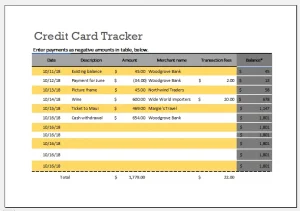 Whether you use a spreadsheet, a budgeting app, or a printable worksheet, a tracker can turn a handful of scattered statements into a clearer picture of your credit card finances. Here’s what to include, how to use one effectively, and what it can—and can’t—do for you.
What Is a Credit Card Tracker Template?
A credit card tracker template is a structured record for the information you want to monitor across one or more cards. Depending on your needs, it might include:
- Card name or issuer
- Current balance and credit limit
- Statement closing date
- Payment due date
- Minimum payment and amount paid
- Interest rate, including promotional rates
- Rewards earned or redeemed
- Fees, credits, and disputed transactions
The template doesn’t replace your card issuer’s official account records. Instead, it gives you a convenient overview and a place to plan and record actions.
Why Use a Credit Card Tracker?
Keep payment dates visible
A tracker can help you see upcoming due dates across multiple accounts. That’s useful if your cards have different schedules or if you prefer to plan payments around payday. Payment reminders can also help reduce the risk of paying late.
The Consumer Financial Protection Bureau (CFPB) advises consumers to pay at least the minimum by the due date and notes that late payments can have consequences, including fees and potential effects on credit standing.[1] A tracker is not a guarantee against missed payments, so consider setting separate calendar or issuer alerts too.
Understand balances and credit limits
Recording balances and limits can help you see how much of each card’s available credit you’re using. For example, if a card has a $5,000 limit and a $1,000 balance, the balance represents 20% of that limit.
Credit utilization is one factor commonly considered in credit scoring models, though scoring formulas vary and no single ratio guarantees a particular score.[2] A tracker can make balances easier to monitor, but it should be used as a planning tool—not as a promise about credit-score results.
Track interest and promotional rates
If you carry a balance, the interest rate and repayment plan matter. A tracker can help you record the annual percentage rate (APR), identify promotional-rate end dates, and compare balances across accounts.
For details about how interest is calculated and when it may apply, refer to your card agreement and statements. Credit card terms can vary, and a tracker should never replace those official documents.
Make rewards easier to follow
If you use rewards cards, a tracker can help you note points, cash back, annual fees, redemption dates, and any spending requirements tied to an offer. This can be useful for organizing information, but rewards programs can change. Check the issuer’s current terms before making spending decisions based on rewards.
What to Include in a Credit Card Tracker Template
A useful template is detailed enough to support your routine, but simple enough that you’ll keep it updated. Consider organizing it into two sections: an account overview and a monthly activity log.
Account overview
| Field | What to record |
|---|---|
| Card or account name | A name you’ll recognize, such as “Travel card” |
| Issuer | The bank or financial institution |
| Credit limit | The limit listed by the issuer |
| APR | The current rate, noting whether it is promotional |
| Statement closing date | The date the billing cycle ends |
| Payment due date | The date payment is due |
| Annual fee | Amount and expected billing month |
| Rewards program | Points, miles, cash back, or other benefits |
| Promotional rate end date | If applicable, verify it against issuer terms |
Avoid storing your full card number, security code, passwords, or other sensitive login information in an ordinary spreadsheet.
Monthly activity log
| Month | Statement balance | Minimum due | Planned payment | Payment made | Due date | Notes |
|---|---|---|---|---|---|---|
| January | $800 | $35 | $200 | $200 | Jan. 22 | Paid in full |
| February | $650 | $30 | $150 | $150 | Feb. 22 | Checked statement |
You can add columns for purchases, refunds, fees, interest, and rewards if those details help you. For many people, however, the statement balance, payment, and due date are enough for a reliable monthly overview.
How to Use the Template
1. Gather information from official records
Use your latest statements and issuer account pages to fill in the starting information. Confirm due dates, balances, rates, fees, and promotional terms directly with the issuer. If a figure in your tracker differs from the official account, treat the issuer’s record as the source to verify.
2. Choose a consistent update schedule
A simple routine is to update the tracker once a week and review it again when each statement arrives. You might record transactions as they happen, or use the tracker primarily for monthly balances and payments. Pick a method you can sustain.
3. Plan payments without overcomplicating the sheet
Record the minimum payment and due date, then add your intended payment amount. After the payment posts, enter the amount actually paid. If you’re paying down balances, you can also note your target for the month.
Make sure any planned payment fits your budget. A tracker can help you organize a repayment plan, but it can’t determine what you can safely afford.
4. Reconcile the tracker against statements
When a statement arrives, compare it with your records. Look for unfamiliar charges, duplicate entries, unexpected fees, or payments that haven’t appeared as expected. If you spot a problem, contact the issuer promptly and follow its instructions for reporting it.
5. Review trends, not just individual numbers
Over several months, the tracker may help you notice patterns: a balance that is growing, recurring charges you no longer use, or a card that is regularly paid late. Use those observations to revisit your budget and payment routine.
Spreadsheet, Printable, or App: Which Format Is Best?
A spreadsheet works well if you want customizable columns, formulas, and a compact view of multiple cards. Keep access limited and use a secure device or storage service.
A printable tracker may suit people who prefer writing things down. Store it somewhere private, since it may contain personal financial information.
A budgeting app may offer automatic transaction imports and reminders. Before connecting accounts, review the app’s privacy policy, security practices, permissions, and fees. Avoid assuming that an app’s summary is always complete; check important figures against issuer statements.
The best format is the one you can maintain securely and consistently.
Common Mistakes to Avoid
- Treating the tracker as the official record. Your issuer’s statements and account terms take precedence.
- Forgetting to update it. An outdated tracker may give a false sense of how much you owe or when a payment is due.
- Recording too much sensitive information. Never include your CVV, passwords, or full card credentials.
- Relying on one reminder. Use issuer alerts or a calendar reminder as a backup for due dates.
- Focusing only on rewards. Rewards are only one part of a card’s value; interest, fees, and spending habits matter too.
- Assuming a specific balance will produce a specific credit score. Credit scoring models differ, and tracking alone does not guarantee a score outcome.
A Simple Monthly Review Checklist
At the end of each billing cycle, ask:
- Did I review the statement?
- Do the purchases and fees look familiar?
- What is the payment due date and minimum amount?
- How much can I reasonably pay?
- Are any promotional rates or annual fees coming up?
- Does my tracker match the issuer’s records?
- Is there a recurring charge I want to review?
A brief review can make the template useful without turning it into a time-consuming bookkeeping project.
Conclusion
A credit card tracker template can help you organize due dates, balances, payments, rates, and rewards in one place. Its real value comes from regular, careful use: update it from reliable records, review statements, protect sensitive information, and set independent reminders for important deadlines. Start with a few essential fields, then add detail only when it helps you make better financial decisions.
Sources
- Consumer Financial Protection Bureau, “What happens if I’m late on a credit card payment?” consumerfinance.gov
- Consumer Financial Protection Bureau, “What is a credit score?” consumerfinance.gov