Credit cards can make everyday spending easier, help you earn rewards, and provide a convenient way to pay. But when you have multiple cards—with different due dates, balances, annual fees, and reward programs—it’s easy to lose track of the details. A missed payment or overlooked fee can undermine the benefits.
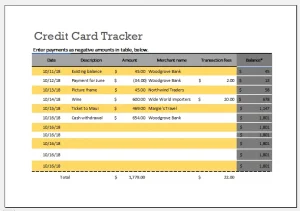 A credit card tracking spreadsheet gives you one place to see what you owe, when payments are due, and how each card fits into your finances. It doesn’t replace your issuer’s statements or account alerts, but it can make your credit-card routine more organized and intentional.
What Is a Credit Card Tracking Spreadsheet?
A credit card tracking spreadsheet is a simple record of your cards and related activity. You can create one in a spreadsheet app such as Google Sheets or Microsoft Excel, or adapt a personal budgeting workbook you already use.
Depending on your needs, it can help you:
- Keep track of card balances and credit limits
- Monitor payment due dates
- Record annual fees and promotional offers
- Review spending by category
- Plan payoff progress
- Track rewards or cash-back earnings
The goal is not to capture every detail for its own sake. It is to make the information you need easier to find and act on.
Why Track Your Credit Cards?
Avoid missed payments
A spreadsheet can list each card’s due date and payment status, helping you build a dependable payment routine. Payment history is an important factor in credit scoring, and late payments may also result in fees or other consequences. The Consumer Financial Protection Bureau (CFPB) recommends paying on time and contacting your card issuer promptly if you’re having trouble making a payment.[1]
A tracker works best alongside automatic reminders or autopay—not as a substitute for them. Check your issuer’s settings carefully, since autopay may be configured to pay a minimum amount, a statement balance, or another amount you select.
Understand your balances and utilization
A tracker can show your balance relative to your credit limit. This ratio is commonly called credit utilization:
Credit utilization ratio = balance ÷ credit limit × 100
For example, a $600 balance on a card with a $3,000 limit represents 20% utilization. A spreadsheet can calculate this automatically for each card.
Credit utilization is one factor used in many credit-scoring models. The CFPB notes that consumers can affect credit scores by managing how much of their available credit they use.[2] However, scoring models differ, and a spreadsheet cannot predict a particular score.
Keep fees and promotional terms visible
Annual fees, introductory APR periods, balance-transfer offers, and other terms can be easy to forget. Recording the relevant dates and amounts gives you a prompt to review whether a card still suits your needs.
Always verify the terms with your issuer. Promotional offers may have conditions, and the end date or consequences of carrying a balance can depend on the specific agreement.
Make spending patterns easier to review
If you record purchases by category—such as groceries, transport, subscriptions, or dining—you can review where your spending is going. This can help you compare actual expenses with a budget and identify recurring charges you may want to revisit.
What to Include in Your Spreadsheet
You can start with a single card list and add detail only if you need it.
Card overview
Useful columns may include:
| Column | What it tracks |
|---|---|
| Card nickname | A label such as “Travel” or “Everyday” |
| Issuer | The bank or credit union |
| Credit limit | The card’s stated limit |
| Current balance | Balance shown by the issuer |
| Statement balance | Amount on the latest statement |
| Minimum payment | Minimum due for that billing cycle |
| Due date | Payment deadline |
| Autopay status | Whether autopay is enabled and what it pays |
| Annual fee | Fee amount and renewal date |
| Notes | Promotional terms or other reminders |
Avoid storing full card numbers, security codes, passwords, or account-login details in the spreadsheet. It is safer to use a nickname or the last four digits, if needed, and protect the file with appropriate account security.
Transaction log
If you want to review purchases, use a separate tab with columns such as:
- Date
- Card nickname
- Merchant
- Amount
- Category
- Payment or refund
- Notes
You do not necessarily need to enter every transaction manually. Many people use their card issuer’s transaction history and record only monthly totals or selected categories. Choose a method you can maintain consistently.
Payment and payoff plan
A payment tab can include:
- Statement balance
- Minimum payment
- Planned payment
- Payment date
- Actual payment
- Remaining balance
For payoff planning, you might also record an estimated monthly payment and the balance remaining after each payment. Estimates are not guaranteed: interest, new purchases, fees, and payment timing can change the result. Use your issuer’s statement and account tools for authoritative figures.
Rewards and benefits
If rewards are important to you, consider tracking:
- Reward type
- Points or cash back earned
- Redemption value, if known
- Expiration dates, if applicable
- Credits or benefits you have used
Reward programs can have complicated rules and changing terms. Confirm values and expiration policies directly with the card issuer or program.
How to Build a Credit Card Tracking Spreadsheet
1. Choose a tool
Pick a spreadsheet app you already know how to use. A basic workbook can have three tabs:
- Cards — account details and due dates
- Transactions — spending records
- Payments — payment history and payoff progress
You can begin with just the Cards tab and add others later.
2. Enter only useful information
Gather details from your latest statements and issuer accounts. Include the information that supports your routine, but avoid collecting sensitive data you don’t need.
For example, a due date and card nickname are useful; a full card number is not. Keep the spreadsheet in a secure location and enable multifactor authentication on the account where it is stored, if available.
3. Add simple formulas
Formulas can reduce repetitive calculations. For example, if the balance is in cell D2 and the credit limit is in C2, a utilization formula might be:
=IFERROR(D2/C2,0)
Format the result as a percentage. If you record planned and actual payments, you can calculate the difference with a formula such as:
=PlannedPayment-ActualPayment
Formula names and separators can vary by spreadsheet program and regional settings, so check the app’s help documentation if a formula does not work.
4. Make deadlines easy to see
Use sorting, filters, or conditional formatting to highlight upcoming due dates. You might flag dates within the next seven days, or mark a payment as complete once it has posted.
Because a spreadsheet may not notify you when you are away from it, also set calendar reminders or issuer alerts.
5. Set a regular review schedule
A weekly check-in can help you catch unusual activity and upcoming deadlines. A monthly review—ideally after statements close—can help you update balances, reconcile payments, and review spending.
The routine can be simple:
- Confirm each new statement and due date.
- Compare the statement with your records.
- Schedule or verify payments.
- Update balances and transaction categories.
- Review fees, subscriptions, and promotional dates.
Spreadsheet vs. Budgeting App
A spreadsheet offers flexibility: you decide which fields to include, how to organize them, and what calculations to use. It can also be a good option for people who prefer not to connect financial accounts to a third-party budgeting service.
The tradeoff is that you may need to update it manually. A budgeting app may import transactions and categorize spending automatically, but features, costs, privacy practices, and account connections differ. Review a service’s security and data policies before linking financial accounts.
Whichever approach you choose, verify important information against the card issuer’s records. A tracker is an organizational aid, not the official source for your balance, payment status, or account terms.
Common Mistakes to Avoid
Treating the spreadsheet as perfectly current
Transactions can post after a delay, and balances may change as payments and refunds are processed. Use your issuer’s app or statement to confirm time-sensitive information.
Recording too much sensitive information
Do not store card security codes, passwords, full account credentials, or other information that could make an account easier to compromise. The Federal Trade Commission advises consumers to protect personal and financial information and take steps to secure online accounts.[3]
Focusing only on the minimum payment
The minimum payment may keep an account current, but paying only the minimum can make debt more expensive and take longer to repay. Review the payment information and payoff disclosures on your statement. If you’re struggling, contact the issuer to ask about options.
Letting rewards drive unnecessary spending
Rewards are useful only when they support your financial goals. Spending more than planned to earn points or cash back can cost more than the rewards are worth.
Forgetting that terms can change
Rates, fees, rewards, and benefits may change according to your card agreement and applicable law. Review notices from your issuer and update your tracker when terms change.
A Simple Monthly Routine
A credit card tracking spreadsheet is most valuable when it supports a repeatable process. Once a month:
- Review statements and recent transactions.
- Confirm payment amounts and due dates.
- Check that payments have posted.
- Update balances and utilization calculations.
- Note any fees, interest, or promotional deadlines.
- Review spending against your budget.
- Investigate unfamiliar transactions with the issuer promptly.
Conclusion
A credit card tracking spreadsheet can turn scattered account details into a clear, practical overview. By recording balances, due dates, payments, fees, and selected spending information, you can make it easier to stay organized and spot issues that deserve attention.
Start small: create a card list, add payment reminders, and update it on a schedule you can keep. Then add transaction tracking, payoff calculations, or rewards information only if they’re useful. Most importantly, protect the spreadsheet, confirm account details with your issuer, and use the tracker to support sound financial habits—not to replace them.
Sources
- Consumer Financial Protection Bureau, “How do I avoid paying late fees on my credit card?”
- Consumer Financial Protection Bureau, “What is a credit score?”
- Federal Trade Commission, “How to keep your personal information secure”